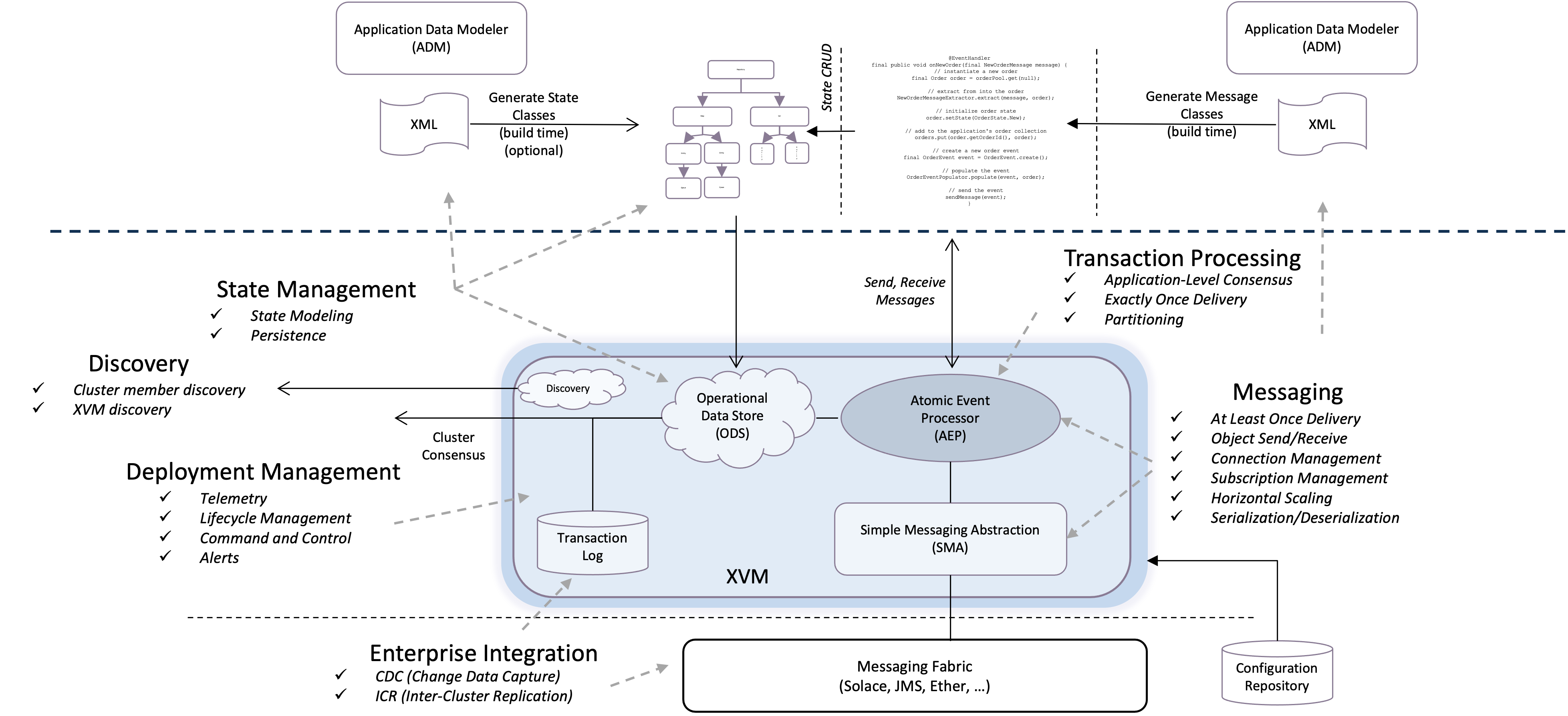
> For the complete documentation index, see [llms.txt](https://docs.xplatform.com/llms.txt). Markdown versions of documentation pages are available by appending `.md` to page URLs; this page is available as [Markdown](https://docs.xplatform.com/talon/concepts-and-architecture/microservice-architecture/configuration-model.md).
# Configuration Model
This page provides a conceptual overview of how Talon microservices are configured, including the Domain Descriptor Language (DDL) and global environment properties.
## Overview
Talon microservices don't interact directly with infrastructure components. Configuration separates business logic from operational concerns like messaging, storage, and high availability. Talon provides two complementary configuration mechanisms for configuring microservices:
1. **DDL (Domain Descriptor Language)**: XML-based configuration for components (buses, applications, XVMs)
2. **Global Environment**: Property-based configuration for runtime behavior (statistics, optimization, trace levels)
## Two Configuration Mechanisms
### DDL (Domain Descriptor Language)
DDL is an XML-based configuration schema that defines microservice components and their settings. It is primarily used to configure:
* Message buses and channels
* Applications (event handlers, storage, high availability)
* XVMs (execution containers)
* System details and metadata
* And more...
**Example DDL**:
```xml
truelatencytrading-system1.0.0order.neworder.canceltrueEventSourcingtrueorder-processortrue
```
**Accessing DDL Configuration in User Code**:
User code accesses DDL configuration through **component descriptors** that are populated from the DDL:
```java
@AppInjectionPoint
public void setEngineDescriptor(AepEngineDescriptor descriptor) {
// Descriptor loaded from DDL configuration
// Access settings configured in DDL
boolean statsEnabled = descriptor.getCaptureTransactionLatencyStats();
// Can also programmatically augment DDL configuration
descriptor.setAdaptiveBatchingEnabled(true);
}
@AppInjectionPoint
public void setMessageBusDescriptor(MessageBusDescriptor descriptor) {
// Descriptor loaded from DDL configuration
String busName = descriptor.getName();
// Access bus settings...
}
```
{% hint style="info" %}
**Talon Runtime Usage**: The Talon runtime uses the same mechanism internally - it creates component descriptors from the DDL to configure buses, stores, engines, and other components.
{% endhint %}
### Global Environment
The global environment provides property-based configuration for Talon runtime behavior. It is primarily used to configure:
* Statistics collection settings
* Optimization modes (latency vs throughput)
* Trace logging levels
* Discovery configuration
* Platform-wide defaults
* And more...
**Global Environment Sources** (in order of increasing precedence):
1. **System Properties** (lowest precedence)
```bash
java -Dnv.msg.latency.stats=true -Dnv.optimizefor=latency ...
```
2. **App Property File**
```properties
# app.properties
nv.msg.latency.stats=true
nv.optimizefor=latency
nv.sma.trace=info
```
Specify file via System property: `java -Dnv.app.propfile=app.properties ...`
Or via environment variable: `export nv_app_propfile=app.properties`
3. **Environment Variables**
```bash
export nv_msg_latency_stats=true
export nv_optimizefor=latency
```
4. **DDL `` Section** (highest precedence)
```xml
truelatencyinfo1000000
```
{% hint style="info" %}
**Precedence**: Properties in the DDL `` section override all other sources. System properties have the lowest precedence.
{% endhint %}
**Accessing Global Environment in User Code**:
The **preferred mechanism** is to use the `@Configured` annotation to inject properties from the DDL `` section:
```java
@Configured(property = "myapp.maxOrderSize", defaultValue = "100000")
private int maxOrderSize;
@Configured(property = "myapp.tradingVenue", defaultValue = "NYSE")
private String tradingVenue;
```
**Alternatively**, use the `XRuntime` API for programmatic access:
```java
import com.neeve.ci.XRuntime;
// Get property value programmatically
String value = XRuntime.getValue("myapp.maxOrderSize", "100000");
int maxOrderSize = Integer.parseInt(value);
```
{% hint style="info" %}
**Talon Runtime Usage**: The Talon runtime uses `XRuntime` and `UtlEnv` APIs internally to access global configuration properties for statistics collection, optimization, trace levels, and other runtime behavior.
{% endhint %}
### DDL vs Global Environment
| Aspect | DDL | Global Environment |
| ------------------------- | ----------------------------------------------------------------------- | ----------------------------------------------------------- |
| **Format** | XML elements and attributes | Property key-value pairs |
| **Configures** | Components (buses, apps, xvms, channels) | Runtime behavior (stats, optimization, trace) |
| **Accessed In User Code** | Via component descriptors | Via @Configured annotation or XRuntime API |
| **Accessed By Platform** | Via component descriptors | Via XRuntime and UtlEnv APIs |
| **Example** | `true` | `nv.msg.latency.stats=true` |
| **Typical Use** | Configure bus connections, app settings, XVM heartbeats | Enable stats, set optimization mode, configure trace levels |
### When to Use Each
**Use DDL** when:
* Configuring message bus connections and channels
* Configuring application messaging, storage, and HA settings
* Configuring XVM heartbeats and managed applications
* Setting component-specific parameters
* Configuration is specific to a component instance
**Use Global Environment** when:
* Enabling runtime statistics collection
* Setting optimization modes (latency vs throughput)
* Configuring trace logging levels
* Setting platform-wide defaults
* Configuration applies globally across the runtime
{% hint style="info" %}
**Note**: Some configuration settings can be specified using either mechanism. For example, trace levels for certain AEP engine loggers can be set via DDL or via global environment properties. When both mechanisms are available, **using DDL is recommended** as it keeps configuration centralized in the DDL file.
{% endhint %}
### Complete Configuration Example
Here's a complete example showing both mechanisms working together:
```xml
truetrue10240latencyinfofine1000000NYSEtrading-system1.0.0order.neworder.canceltrueEventSourcingtrue
```
Accessing the configuration in user code:
```java
public class OrderProcessor extends EventHandler {
// Inject from global environment
@Configured(property = "orderprocessor.maxOrderSize", defaultValue = "100000")
private int maxOrderSize;
@Configured(property = "orderprocessor.tradingVenue", defaultValue = "NYSE")
private String tradingVenue;
// Access DDL configuration via descriptor
@AppInjectionPoint
public void setEngineDescriptor(AepEngineDescriptor descriptor) {
// captureTransactionLatencyStats came from DDL
boolean statsEnabled = descriptor.getCaptureTransactionLatencyStats();
}
@AppEventHandler
public void onNewOrder(NewOrderMessage order) {
// Use injected configuration
if (order.getSize() > maxOrderSize) {
// Reject order...
}
}
}
```
## Configuration Architecture
Now that we understand the two configuration mechanisms at a high level, let's dive into the architectural details of how Talon processes and stores configuration.
### Configuration Repository
Internally, Talon uses a **configuration repository** to store component configuration parsed from the DDL. The repository is an internal platform component that developers don't interact with directly.
**Key characteristics**:
* The repository stores configuration in a proprietary format keyed by **hierarchical names**
* Components are uniquely identified by hierarchical names comprised of their type and unique name
* Example: An AEP engine named "order-processor" has the repository name `/aep/engines/order-processor`
* The Talon runtime uses these hierarchical names internally when loading descriptors from the repository
* The repository implements the [`com.neeve.config`](https://build.neeveresearch.com/core/javadoc/LATEST/com/neeve/config/package-summary.html) API (internal to Talon runtime)
{% hint style="info" %}
**Note**: Developers never directly interact with the configuration repository. Platform components and user code interact with higher-level descriptor objects, not the repository itself.
{% endhint %}
### Global Environment Storage
The global environment is stored in a map-like structure maintained by the Talon runtime. It is populated from multiple sources during initialization and provides a unified view of all runtime properties.
**Characteristics**:
* Assembled from System properties, app propfile, environment variables, and DDL `` section
* DDL `` properties have **highest precedence**
* XVM-specific `` sections are merged with the global `` section
* Accessed via `XRuntime.getValue()` and `UtlEnv` APIs
### Environment Sources and Precedence
The global environment is populated from multiple sources. When the same property is defined in multiple sources, the source with higher precedence wins.
**Sources in increasing precedence order** (lowest to highest):
1. **System Properties** (lowest precedence)
* Java system properties (`-Dproperty=value`)
2. **App Propfile**
* Properties file specified via `nv_app_propfile` or `-Dnv.app.propfile`
* Overrides System properties
3. **Environment Variables**
* OS-level environment variables
* Override App propfile
4. **DDL `` Section** (highest precedence)
* Properties specified in the `` element
* Union of global `` and XVM-specific `` sections
* Highest precedence (overrides all other sources)
**Example** showing precedence:
```bash
# System property (lowest precedence)
java -Dnv.optimizefor=throughput ...
```
```properties
# app.properties (overrides System property)
nv.optimizefor=latency
```
```xml
none
```
**Result**: `nv.optimizefor` will be `none` because DDL `` has highest precedence.
{% hint style="warning" %}
**Important**: Some global platform properties CANNOT be set in the `` section because they are needed before the DDL can be parsed. These must be specified using System properties, app propfile, or environment variables. See [Configuration Reference](/talon/reference/configuration.md) for the "Can Set in ``?" indicator for each property.
{% endhint %}
### How DDL and Global Environment Interact
Both mechanisms work together during application initialization:
1. **Assemble Global Environment**: The Talon runtime collects properties from System properties, app propfile, environment variables, and merges them (with appropriate precedence)
2. **Parse DDL File**: The Talon runtime reads and parses the XML configuration file
3. **Merge DDL `` Section**: Properties from the DDL `` section are merged into the global environment (with highest precedence)
4. **Variable Substitution**: During DDL parsing, variable references like `${VARNAME::DEFAULT}` are substituted from the global environment
5. **Populate Repository**: Component configuration from DDL elements (``, ``, ``) is stored in the configuration repository
6. **Create Components**: The Talon runtime creates components by loading descriptors from the repository and using global environment for runtime configuration
**Example showing interaction**:
```xml
192.168.1.100tradingtrue
```
In this example:
* `${solace.host}` is substituted with `192.168.1.100` from the global environment
* `${solace.vpn}` is substituted with `trading` from the global environment
* `nv.msg.latency.stats` configures runtime statistics collection
* The `` element populates the configuration repository for component creation
## Configuration Lifecycle
The configuration of Talon components is tied closely to the application lifecycle. Understanding this lifecycle helps clarify when and how configuration is applied.
### Configure Phase
When an application is launched, the first task is to populate both the configuration repository and global environment before any Talon runtime machinery is invoked. This ensures the runtime machinery picks up the correct configuration.
**Steps**:
1. Assemble the **global environment** from System properties, app propfile, environment variables, and DDL `` section (with DDL `` having highest precedence)
2. Parse the **DDL file** and populate the **configuration repository**
3. Use the environment for variable substitution during DDL parsing
### Run Phase
Once the configuration repository and environment are populated, the application can create and use platform components.
**Steps for creating a component**:
1. Create an instance of the component descriptor (e.g., [`AepEngineDescriptor`](https://build.neeveresearch.com/core/javadoc/LATEST/com/neeve/aep/AepEngineDescriptor.html))
2. Load the descriptor contents from the configuration repository using its `load()` method
3. The descriptor initializes itself using configuration from the repository (keyed by the component's hierarchical name)
4. Create the component using the loaded descriptor
{% hint style="info" %}
**Note**: The hierarchical naming and repository access happen internally. Developers work with descriptor objects, not the repository directly.
{% endhint %}
## Populating Configuration from DDL
How the DDL populates the configuration repository depends on whether Talon is used in an embedded or non-embedded manner.
### Embedded Use
Talon should be used in an **embedded manner** when the application's main entry point is in the application code.
#### XML Descriptor (RECOMMENDED)
Talon allows applications to describe configuration in XML form (DDL) and programmatically initialize the repository using the XML descriptor.
* **Schema**: Configuration is defined by the Domain Descriptor Language (DDL) schema, [`x-ddl.xsd`](https://build.neeveresearch.com/core/schema/LATEST/x-ddl.xsd)
* **Configuration Class**: Use [`VMConfigurer`](https://build.neeveresearch.com/core/javadoc/LATEST/com/neeve/config/VMConfigurer.html) to configure the Talon runtime from an XML descriptor
* **Recommendation**: This is the recommended mechanism if configuration can be stored in or converted to XML form
**Example**:
```java
import com.neeve.config.VMConfigurer;
public class MyApplication {
public static void main(String[] args) throws Exception {
// Initialize repository from DDL
VMConfigurer.configure("config.xml");
// Now create and use platform components
// ...
}
}
```
#### Component Descriptors (PROGRAMMATIC)
Each Talon component has a companion configuration descriptor for programmatic configuration. Descriptors implement setters/getters for configuration attributes and can save properties to the repository.
This mechanism is suited when configuration cannot be easily transformed to XML form.
**Component Descriptors**:
| Component | Descriptor Class | Description |
| -------------------- | ------------------------------------------------------------------------------------------------------------------------------------------------------- | --------------------------------------------------------------------- |
| SMA Bus | [`MessageBusDescriptor`](https://build.neeveresearch.com/core/javadoc/LATEST/com/neeve/sma/MessageBusDescriptor.html) | Configures a message bus |
| SMA Channel | [`MessageChannelDescriptor`](https://build.neeveresearch.com/core/javadoc/LATEST/com/neeve/sma/MessageChannelDescriptor.html) | Configures a bus channel |
| ODS Store | [`StoreDescriptor`](https://build.neeveresearch.com/core/javadoc/LATEST/com/neeve/ods/StoreDescriptor.html) | Configures the store for an engine (providing HA) |
| ODS Store Replicator | [`StoreReplicatorDescriptor`](https://build.neeveresearch.com/core/javadoc/LATEST/com/neeve/ods/StoreReplicatorDescriptor.html) | Configures store replication to backup members |
| ODS Persister | [`StorePersisterDescriptor`](https://build.neeveresearch.com/core/javadoc/LATEST/com/neeve/ods/StorePersisterDescriptor.html) | Configures store disk persistence |
| ODS ICR | [`StoreInterClusterReplicatorDescriptor`](https://build.neeveresearch.com/core/javadoc/LATEST/com/neeve/ods/StoreInterClusterReplicatorDescriptor.html) | Configures store inter-cluster replication (e.g., remote data center) |
| AEP Engine | [`AepEngineDescriptor`](https://build.neeveresearch.com/core/javadoc/LATEST/com/neeve/aep/AepEngineDescriptor.html) | Configures the application's AepEngine |
| XVM (Talon XVM) | [`SrvConfigDescriptor`](https://build.neeveresearch.com/core/javadoc/LATEST/com/neeve/server/config/SrvConfigDescriptor.html) | Configures an XVM |
**Example** (augmenting XML configuration programmatically):
```java
@AppInjectionPoint
public void setEngineDescriptor(AepEngineDescriptor descriptor) {
// Descriptor already loaded from repository via XML
// Augment with programmatic settings
descriptor.setAdaptiveBatchingEnabled(true);
descriptor.setAdaptiveBatchingCeiling(100);
}
```
{% hint style="info" %}
**Tip**: With the exception of SrvConfigDescriptor, applications can augment configuration seeded by the XML descriptor programmatically using component descriptors.
{% endhint %}
#### Configuration Script (INTERNAL)
Talon supports an internal scripting format for configuration. This format is not recommended for external use and is listed for informational purposes only.
### Non-Embedded Use
Talon is used in a **non-embedded manner** when the application's main entry point is in the Talon XVM.
In this mode:
* The configuration repository is initialized from external storage via a persistence plugin
* The recommended approach is to use deployment tools like Robin for configuration, deployment, and management
* Robin processes the same XML descriptor but materializes it from external storage rather than the filesystem
## Accessing Environment Properties in Application Code
The **preferred mechanism** for accessing user-defined properties from the global environment is to declare them in the DDL `` section and inject them using the `@Configured` annotation:
```xml
1000000NYSE
```
```java
@Configured(property = "myapp.maxOrderSize", defaultValue = "100000")
private int maxOrderSize;
@Configured(property = "myapp.tradingVenue", defaultValue = "NYSE")
private String tradingVenue;
```
See [Injecting Configuration](/talon/developing-applications/authoring-user-code/configuration/injecting-configuration.md) for complete details on using `@Configured`.
**Alternative programmatic access** is available via the [`XRuntime`](https://build.neeveresearch.com/core/javadoc/LATEST/com/neeve/ci/XRuntime.html) API:
```java
import com.neeve.ci.XRuntime;
// Get a property value programmatically
String value = XRuntime.getValue("myapp.maxOrderSize", "100000");
int maxOrderSize = Integer.parseInt(value);
```
{% hint style="info" %}
**Note**: The [`UtlEnv`](https://build.neeveresearch.com/core/javadoc/LATEST/com/neeve/util/UtlEnv.html) API is also available but should only be used when directed by Neeve support.
{% endhint %}
## DDL Features
The DDL provides several powerful features for managing configuration:
### Variable Substitution
DDL supports variable substitution using the syntax `${VARNAME::DEFAULT}` where:
* `VARNAME` is the property name to substitute
* `DEFAULT` is an optional default value if the property is not found
Variables are substituted from the global environment (System properties, app propfile, environment variables, DDL ``).
**Example**:
```xml
192.168.1.10055555
```
If `solace.host` is not defined, the substitution fails. If `solace.port` is not defined, it defaults to `55555`.
**Substitution Sources** (in precedence order):
1. System properties
2. App propfile
3. Environment variables
4. DDL `` section (highest precedence)
**Special Characters in Property Names**:
* `.` (period) is used as a hierarchical separator in XML
* `-` (dash) and `_` (underscore) are allowed in property names
**Example with hierarchical properties**:
```xml
true
```
This creates the property `nv.msg.latency.stats=true`.
### DDL Overrides
Any DDL attribute or element value can be set or overridden at runtime using specially-named system properties. DDL overrides serve two purposes:
1. **Set values** - Provide configuration values for elements not present in the DDL XML
2. **Override values** - Change configuration values that are present in the DDL XML
This allows configuration to be externalized without modifying the DDL file, which is particularly useful for environment-specific configuration, runtime tuning, and CI/CD deployments where the same DDL is used across environments.
#### Override Property Naming Pattern
DDL override properties follow a hierarchical naming pattern that mirrors the XML structure:
```
[prefix].[section].[instance-key].[path-to-element]
```
**Components:**
* **Prefix**: `x.` (default, configurable via `nv.ddl.override.prefix` system property)
* **Section**: Top-level DDL section (`busProviders`, `buses`, `apps`, `xvms`)
* **Instance Key**: The `name` attribute value of the instance (e.g., bus name, app name, XVM name)
* **Path**: Dot-separated path following the XML hierarchy to the target element or attribute
#### Basic Examples
**Example 1: Override an existing value**
Override a bus descriptor defined in DDL:
```xml
```
```bash
# Override the descriptor at runtime
-Dx.buses.bus.market-data.descriptor=solace://prod-host:55555
```
**Example 2: Set a value not in DDL**
Set storage configuration without it being in the DDL:
```xml
```
```bash
# Set storage configuration via override (no DDL needed)
-Dx.apps.order-processor.storage.enabled=true
-Dx.apps.order-processor.storage.persistence.enabled=true
-Dx.apps.order-processor.storage.persistence.flushOnCommit=false
```
The above creates the storage configuration as if it were present in the DDL.
**Example 3: Override nested settings:**
Change an existing nested value in the DDL:
```xml
false
```
```bash
# Override the flushOnCommit value at runtime
-Dx.apps.order-processor.storage.persistence.flushOnCommit=true
```
**Example 4: Set XVM heartbeat settings:**
Set heartbeat configuration that doesn't exist in DDL:
```xml
```
```bash
# Set heartbeat configuration via overrides
-Dx.xvms.trading-xvm.heartbeats.enabled=true
-Dx.xvms.trading-xvm.heartbeats.interval=10
```
**Example 5: Override existing XVM heartbeat settings:**
Change an existing heartbeat interval value:
```xml
```
```bash
# Override the interval value at runtime
-Dx.xvms.trading-xvm.heartbeats.interval=10
```
#### Special Cases
**1. Key Attributes (Not Overridable)**
Attributes that serve as keys (typically `name` attributes) cannot be overridden because they uniquely identify instances:
```xml
```
**2. Environment Properties**
Properties in the `` section use the `x.env.` prefix for DDL overrides but are accessed directly (without prefix) in code:
```xml
true
```
```bash
# Set or override via DDL override (uses x.env. prefix)
-Dx.env.nv.msg.latency.stats=false
# Or set directly as system property (no prefix, becomes env property)
-Dnv.msg.latency.stats=false
```
The `x.env.*` pattern allows you to set environment properties that aren't in the DDL `` section, or override ones that are.
**3. Template Configuration**
Template properties use a special pattern with the `templates` keyword:
```xml
solace
```
```bash
# Override template property
-Dx.buses.templates.solace-template.provider=jms
```
**4. Nested Keyed Elements**
When child elements have their own `name` attribute, include it in the path:
```xml
Guaranteed
```
```bash
# Note: uses channel name directly (not "channel.orders")
-Dx.buses.market-data.orders.qos=BestEffort
```
#### Setting Override Properties
Override properties can be set via multiple mechanisms:
**1. System Properties (command line):**
```bash
java -Dx.apps.order-processor.storage.persistence.flushOnCommit=true \
-Dx.buses.market-data.orders.qos=BestEffort \
-jar myapp.jar
```
**2. Environment Variables:**
```bash
export x_apps_order_processor_storage_persistence_flushOnCommit=true
export x_buses_market_data_orders_qos=BestEffort
```
**3. App Properties File:**
```properties
# app.properties
x.apps.order-processor.storage.persistence.flushOnCommit=true
x.buses.market-data.orders.qos=BestEffort
```
Specify the properties file via: `-Dnv.app.propfile=app.properties`
#### Override Precedence
When both DDL and override properties are specified:
1. DDL Override properties (highest precedence)
2. DDL XML values (lowest precedence)
This allows runtime values to override static configuration.
#### Pattern Construction Examples
| XML Element Path | Override Property |
| --------------------------------------------------------------- | ------------------------------------------ |
| `` | `x.busProviders.custom.*` |
| `` | `x.buses.bus.mkt-data.descriptor` |
| `` | `x.buses.mkt-data.orders.*` |
| `` | `x.apps.myapp.mainClass` |
| `` | `x.apps.myapp.storage.persistence.enabled` |
| `` | `x.xvms.myxvm.heartbeats.interval` |
For complete override property documentation for all DDL elements, see the [Configuration Reference](/talon/reference/configuration.md).
### DDL Templates
**Since 3.8**: DDL templates reduce configuration repetition by allowing you to define reusable configuration blocks.
**Example**:
```xml
solacetradingappsecret
192.168.1.9
55555
192.168.1.10
55555
```
Templates are applied first, then bus-specific settings override template values.
### DDL Profiles
**Since 3.8**: DDL profiles enable environment-specific configuration within a single DDL file.
**Example**:
```xml
```
**Activating a profile**:
```bash
# Via system property
java -Dnv.ddl.profile=production ...
# Via environment variable
export nv_ddl_profile=production
```
When a profile is activated, its configuration overrides the default configuration.
### DDL Processing Order
The DDL is processed in the following order:
1. **Parse DDL file**: Read and validate XML structure
2. **Assemble global environment**: Merge System properties, app propfile, environment variables, DDL `` (with precedence)
3. **Apply active profile**: If a profile is specified, merge profile configuration
4. **Perform variable substitution**: Replace `${VARNAME::DEFAULT}` references from environment
5. **Apply DDL overrides**: Apply command-line `x.*` overrides
6. **Populate repository**: Store component configuration in repository
## Troubleshooting Configuration
### Enabling DDL Trace
To troubleshoot configuration issues, enable DDL trace logging:
```bash
# Must use System property (cannot use DDL section)
java -Dnv.ddl.trace=true ...
```
This outputs detailed information about:
* Variable substitution
* Profile activation
* DDL parsing and validation
* Property precedence resolution
DDL trace output goes to the `nv.ddl` logger at `INFO` level.
### Common Issues
**Variable substitution fails**:
* Check that the property is defined in one of the environment sources
* Verify property name spelling (case-sensitive)
* Enable DDL trace to see substitution details
**Property has wrong value**:
* Check precedence order (DDL `` has highest precedence)
* Enable DDL trace to see which source provided the value
* Verify profile activation if using profiles
**Property cannot be set in `` section**:
* Some properties (like `nv.ddl.trace`) must be set via System property because they're needed before DDL parsing
* See [Configuration Reference](/talon/reference/configuration.md) for the "Can Set in ``?" indicator
## Related Topics
* [Injecting Configuration](/talon/developing-applications/authoring-user-code/configuration/injecting-configuration.md) - Using @Configured annotation in application code
* [Configuration Reference](/talon/reference/configuration.md) - Complete DDL elements and global properties reference
* [Configuring the Runtime](/talon/developing-applications/configuring-the-runtime.md) - Feature-specific configuration guides
## Next Steps
1. Understand the difference between DDL (component configuration) and Global Environment (runtime properties)
2. Review the [Configuration Reference](/talon/reference/configuration.md) for complete DDL syntax and global properties
3. Learn how to use DDL templates and profiles for environment portability
4. Use [Injecting Configuration](/talon/developing-applications/authoring-user-code/configuration/injecting-configuration.md) to access configuration in your application code
5. Enable DDL trace logging to troubleshoot configuration issues